
Floor-Mounted Radiographic System medical imaging solutions

Floor-Mounted Radiographic System

Product Categories

In This Category

Column DR System from Angell

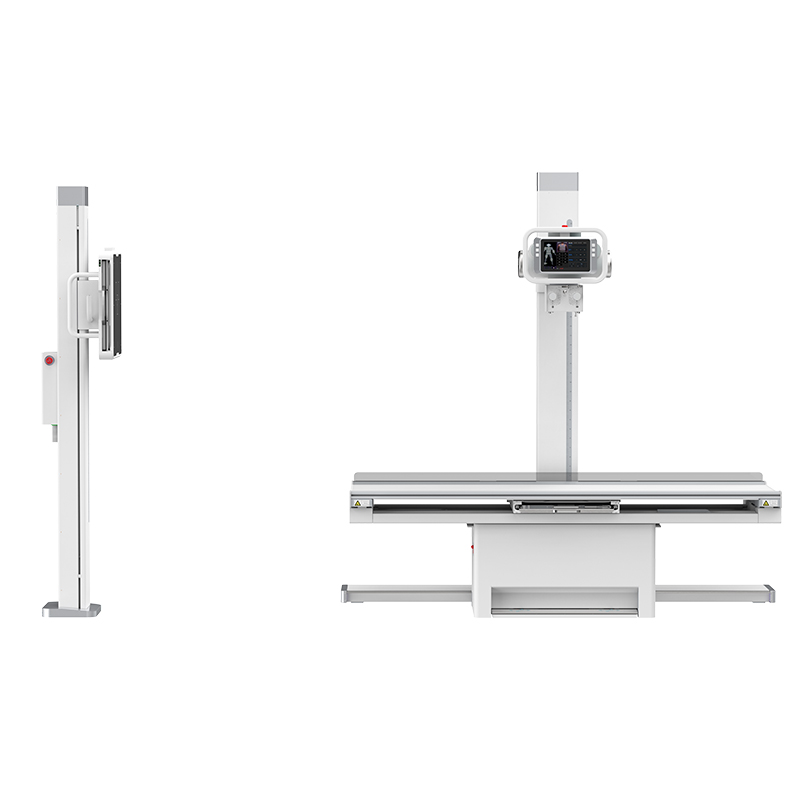
MTP Series floor-mounted radiographic system with column stand and floating radiography table
Floor-Mounted Radiographic System
MTP Series

A column DR system for general radiography rooms, configured with a four-way floating radiography table and a bucky stand.

  • Four-way floating radiography table with automatic or manual operation for clinical positioning.
  • Electric up-and-down X-ray tube automatically followed by the flat panel detector on the bucky stand.
  • Rotating tube column stand fits stretcher and wheelchair examination.
  • LCD touch screen panel on the column for adjusting parameters near the table.

Selection Guide

Static digital radiography or dynamic imaging?

Imaging mode is the first specification decision for an X-ray room. A static system captures still radiographs. A dynamic system captures still radiographs and continuous image sequences. Systems in this category are static. Match the mode to the examinations the department performs.

 Static digital radiographyDynamic imaging
What it capturesSingle still radiographs at the moment of exposure.Still radiographs plus continuous image sequences of movement.
Typical useRoutine chest, abdomen, spine and limb examinations in a general X-ray room.Examinations where motion or a real-time view carries the diagnostic information.
OperationA limited mode set. Shorter operator training and a direct path from positioning to exposure.A broader mode set. Requires additional operator training and workflow design.
Where to look nextThe MTP Series above. See ceiling-mounted dynamic DR systems, mobile dynamic DR systems or UC-ARM dynamic DR systems.
Why a Fixed Floor DR

Cost-efficient coverage of routine radiography

A fixed floor DR targets high-volume routine examinations at a predictable cost of ownership. Three characteristics of the configuration drive that result.

Simpler installation

The column is anchored to the floor slab. The room requires no overhead rail system, which reduces the scope of the building work needed to commission it.

Repeatable room geometry

Tube, table and bucky stand hold the same positions across every examination. Radiographers repeat a fixed set of positioning routines, which supports throughput on a routine list.

Fewer moving assemblies

A static column DR has a narrower mechanical scope than a suspended or multi-axis system. Fewer moving assemblies means fewer service points over the life of the room.

Standard X-Ray Room Setup

What to confirm before installation

Room requirements vary by model and by national radiation-protection regulation. Confirm all figures against the installation documentation for the system specified. Address the following items at the planning stage.

Room dimensions and equipment positions

Floor area and ceiling height must accommodate the column travel, the table footprint and the bucky stand, with working space around the patient.

Floor loading and fixing points

The column and the table transfer load to the floor slab and are anchored to it. Verify the structural condition of the floor before installation is scheduled.

Power supply and earthing

Supply capacity, phase and earthing arrangements are specified per system. Confirm them against the site's electrical drawings.

Radiation shielding and control area

Wall, door and viewing-window shielding and the position of the control area follow the radiation-protection requirements in force locally.

Patient access routes

Door width and the approach to the table determine whether stretcher and wheelchair patients can be positioned without transfer.

Network and image management

Agree connections to the department's image management and reporting systems during planning, ahead of commissioning.

Contact Angell

Specify a floor-mounted radiographic system

Send us your room dimensions and examination volume. Our team will return a system configuration, an installation checklist and a quotation.